One goal for the whole school, on your own website
Add up every fundraiser and the cash raised offline into one target, then put a live thermometer on your school website. It updates as money comes in.
Included free with every Raised account.
New playground fund
$18,450
raised of $25,000 goal
73% of the way there
What is a Raised fundraising goal?
It is a single target your school, PTA or club works towards across several fundraisers. You link the campaigns that count towards it, such as a colour run, a product fundraiser and a donation page, and add money raised outside Raised, like a cash mufti day or a grant. Raised adds it all up.
The total shows as a thermometer, progress bar or percent ring that you can embed on your website, and on a goal page you can share in newsletters. Both show the current figure every time they load, so the thermometer on the school noticeboard never goes out of date.
Set it up in four steps
- 1
Set your goal
Name it, set the target and pick a colour. For example, $25,000 for a new playground.
- 2
Link your campaigns
Add the fundraisers that count towards it. Their totals flow in as money comes in.
- 3
Add money raised offline
Record cash days, sausage sizzles and grants so the total shows everything.
- 4
Put it on your website
Copy the embed code into your school site, or share the public goal page link.
How it looks on a school website
Paste the embed code where you want the widget. This example page uses a thermometer in the sidebar and a progress bar under the article. Each fits its space and matches the colour you chose for the goal.
How to add it to Wix, Squarespace, WordPress or Google Sites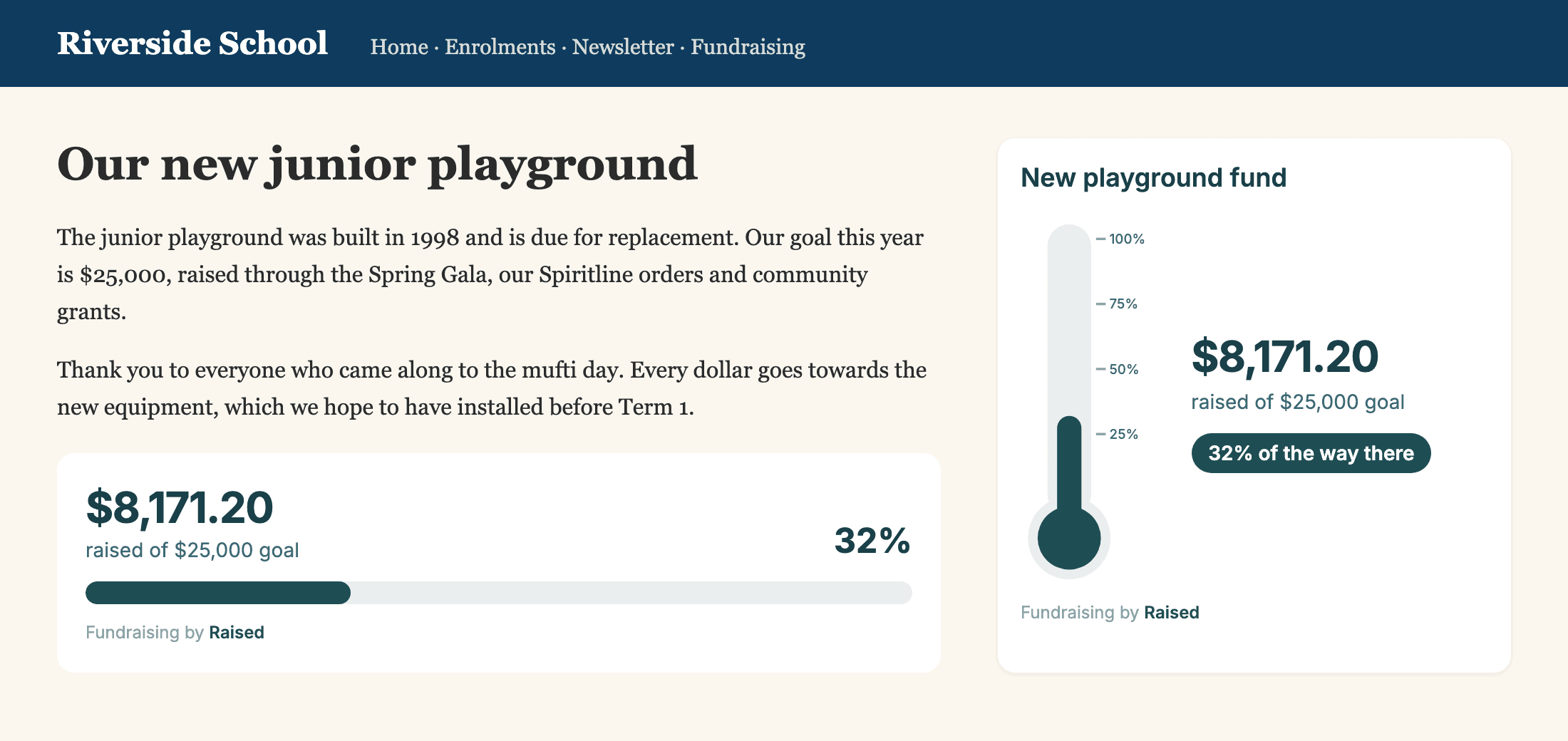
An example school page with made-up figures.
Everything counts towards the same number
Online orders, donations and the cash tin, in one place.
One total across campaigns
A colour run, a pie drive and a donation page can all count towards the same goal. Each adds the amount raised it shows on its own page.
Cash and grants count too
Add money raised outside Raised as a manual donation. It goes towards the goal without touching any campaign, payout or receipt.
Embed on any website
Copy two lines of code into Wix, Squarespace, WordPress, Google Sites or your school's CMS. The widget sizes itself to fit.
Thermometer, bar or ring
Pick the style that suits the space, show or hide the dollar figure, and use more than one on the same page.
Always up to date
Every page load shows the current total. Nobody has to redraw the thermometer on the school noticeboard each week.
A page to share
Each goal has its own page with the thermometer and a link to every campaign, ready for newsletters and social posts.
What groups use it for
- New playground or sports shed
- Classroom technology
- School camp and trips
- Annual PTA or PFA target
- Kapa haka or sports tours
- Club rooms and equipment
Planning the fundraisers that will feed your goal? See school fundraising on Raised and sponsored athons.
Good to know
- A goal counts in NZD or AUD, and only campaigns in the same currency can be linked.
- A campaign counts towards one goal at a time. Linking it to a new goal moves it across.
- Manual donations are only for the goal. To add cash to a campaign's own total, record it on the campaign instead.
- Emails and social posts cannot run embed code, so share the goal page link there.
Fundraising goal and thermometer questions
Common questions from schools and clubs setting up an overall goal on Raised.
What is an overall goal on Raised?
It is one target your organisation works towards across several campaigns, such as $25,000 for a new playground. You link the campaigns that count towards it and add any money raised offline. Raised adds it all up and shows the total as a thermometer, progress bar or percent ring.
How do I put the thermometer on our school website?
Open your goal in the Raised dashboard, choose a style and copy the embed code. Paste it into a Code, HTML or Embed block on your website, such as a Custom HTML block in WordPress, a Code block in Squarespace or an Embed element in Wix. It updates each time someone loads the page.
Can we count cash and money raised outside Raised?
Yes. Add a manual donation to the goal with what it came from, the amount and the date, for example a cash mufti day or a grant. It counts towards the goal only, so it does not change any campaign, payout or receipt.
Which campaigns can count towards a goal?
Any of your campaigns, including product fundraisers, donation pages, crowdfunding and athons, as long as they are in the same currency as the goal. Each campaign counts towards one goal at most, and counts the same amount raised it shows on its own page.
Can we show the percentage without the dollar amount?
Yes. Untick Show dollar amounts when you copy the embed code and the widget shows only the percentage. You can also hide the goal name if your page already has a heading.
Can we share the goal in an email newsletter?
Emails cannot run embed code, so share the link to your public goal page instead. It shows the thermometer and links to each campaign supporters can give to. The page is not listed in search engines.
What happens when we pass our target?
The thermometer, bar and ring fill to the top and stay full, while the dollar figure and percentage keep counting, so a goal can show 112%.
Does it cost anything?
No. Overall goals and the embed are included with every Raised organisation account. Your campaigns carry their normal fees, and manual donations carry none because the money never goes through Raised.
Give your fundraising one number to aim for
Set the goal, link your campaigns, and put the thermometer on your website.